The Complete WordPress SEO Guide for Better Search Rankings
The Complete WordPress SEO Guide for Better Search Rankings
With WordPress powering over 43% of all websites globally with a commanding 61.3% market share, competition for visibility is intense.
Our guide will change the perspective from the basic setup to a more advanced, user-friendly optimization for your site and its content to rank or be preferred by both search algorithms and advanced AI models.
Key Highlights We Will Discover:
● Core Vitals Optimization: The concrete steps you can take to achieve top-quality site speed and address mobile-friendly issues.
● Semantic SEO: Knowing and applying keyword intent terms along with LSI terms in creating your AI-ready content and rich snippets.
● Technical Authority: Set up the framework of WordPress necessary, along with key plugins, sitemaps, and security to index properly.
This is the direct blueprint for increasing your WordPress site to true authority in your niche, which leads to significantly improved rankings and organic traffic.
Here are 11 essential tips to optimize your WordPress site for SEO success
1. Select the Appropriate SEO Plugin and Set Up the Basics for All Pages
The SEO Plugin (like Yoast SEO, Rank Math or anything else) that you choose to install and properly configure first is a critical step.
Think of your plugin as a co-pilot on your site. It will handle all of the complicated and back-end signals that Google is now looking for as part of the web experience.
Before you start looking at keyword strategies, it is important to have a strong technical foundation.
The Site Health tool in WordPress is a great place to start with some basic checks (i.e., PHP version, plugin status), but a trusted 3rd party audit will provide a deeper review.
Lastly, configure a clean Title Separator for your post category, and put your primary keywords in your blog's header, title, and tagline.
Why it matters: An initial, structured setup will ensure that all the individual pieces of content you create have the best possible start in search engine trust.
2. Establish a Simple, User-Friendly Permalink Structure
Permalinks or permanent URLs are one of the most apparent signals for SEO to users and search engines alike.
An organised descriptive URL offers a better chance to be engaging and relevant to the user at the SERPs, which affects your organic CTR, which is a ranking factor.
Keep your permalink short, descriptive of the content, written with the primary focus keyword for that page or post, and easily readable.
Why it matters: A clean URL provides a stronger relevancy signal to Google, but also makes your link more clickable when you’re sharing it on social media or embedding it in other articles, and is also a positive ranking signal that improves how high-quality your content appears to be.
3. Conduct Thorough Keyword Research and Map Intent
To generate high-ranking content, perform thorough keyword research at the outset. Perhaps the most important consideration is to understand the search intent (Informational, Navigational, Transactional or Commercial Investigation) of the keywords you want to use in your content creation.
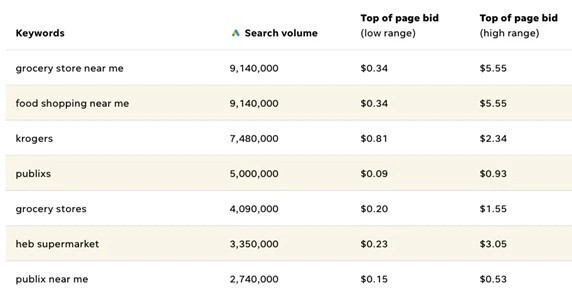
Once you have your main keyword identified, you can identify several supplementary LSI keywords (Latent Semantic Indexing) relevant to that main keyword that naturally come up in your subject area.
Why it matters: Using these keywords as a semantic cluster (or collection of related terms and phrases) in your content is a signal (to AI and search engines) that you provide an extensive and thorough answer to an inquiry the user has, thereby establishing the authority of your content and increasing the chances it ranks highly.
4. Enhance On-Page Elements for Each Post and Page
On-page SEO is essentially about creating content that humans and search engines want!
Start with the Title Tag: this title for the search result should be catchy, and your main keyword should appear at the beginning!
Now, onto your Meta Description, which can be thought of as a short ad to entice readers.
Next, include one main H1 title, and then use H2 and H3 headings to clarify the text, thereby helping the reader (and Google’s AI) understand the summarised text.
Why it matters: BrightEdge research shows that organic search results are responsible for over 53% of all website traffic for businesses. With maximum on-page optimization of every WordPress page and blog post, you can ensure your site is ranked appropriately to receive the majority of that traffic.
5. Master Internal and External Linking Strategies
Think of linking as your website's plumbing system to make sure authority flows properly, and that both users and search engines can find what matters to them. This is a critical component of credibility and other new AI summaries.
Internal Linking:
● Use relevant anchor text: The words you click on (the anchor text) should have target keywords that directly explain what the internal page is about.
● The benefit: This increases authority to new pages immediately, allows Google to discover the pages faster, and provides the primary topics and hierarchies across your whole site.
External Linking (Building Trust):
● Link Out to Authority: When you add a statistic, a study, or an important idea, link to a reputable source (like a university, a large news organisation, or a recognised authority in your industry).
● The Benefit: By linking to a credible source, you provide signals to search engines that your content is trustworthy, research, factual and authoritative content within your area of expert knowledge.
6. Optimize All Images for Speed and Accessibility
Images can either hinder the performance of your website and decrease your ranking, or enhance your SEO/ User Experience.
In order to avoid this, always remember to compress your images within a plugin before uploading them to WordPress. You ideally want the file size to be below 100 KB.
Before you upload the image, rename the image file, it can be both descriptive and loaded with keywords.
Once the image is uploaded, fill out the Alt Text field. The Alt Text field serves to describe the image to those with visual impairments and is a strong accessibility signal to Google, and one way that you will be able to even rank in Google Image Search in particular.
7. Prioritize Site Speed and Core Web Vitals Performance
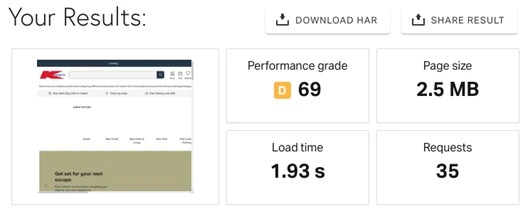
The speed of your website is the top-ranking factor and is formalised in Google's Core Web Vitals (CWV) metrics.
A slow "speed" on your website results in a bad user experience, a higher bounce rate and a lower ranking.
Your first step in building a faster WordPress site is to choose a hosting environment that focuses on speed and performance.
The next step is to install a caching plugin (for example, WP Rocket or LiteSpeed Cache) to create a cached static version of the page or pages.
8. Ensure Your Website is Fully Mobile Responsive
Since the vast majority of organic search traffic (and nearly all AI interaction) comes from mobile, you must perform a mobile-first indexing approach.
Search engines focus on the mobile-friendly version of your content for indexing and ranking purposes in search results.
A superior quality WordPress site should provide an excellent experience on all screens without tiny, unreadable text or excessive horizontal screen scrolling.
Tip: You can use Google's Mobile-Friendly Test for the evaluation of mobile-friendliness. If you are struggling to produce a compliant mobile theme and mobile experience, you will need to transition to a modern theme that is responsive, lightweight, and fast.
Additionally, with interactive elements like buttons and links, be sure to use spacing and proper dimensions to account for finger tapping, in keeping with touch target best practices.
9. Create and Submit an XML Sitemap
An XML Sitemap is a written map of the structure of your website, which tells search engines exactly where all of your pages, posts, and important content are located on the website.
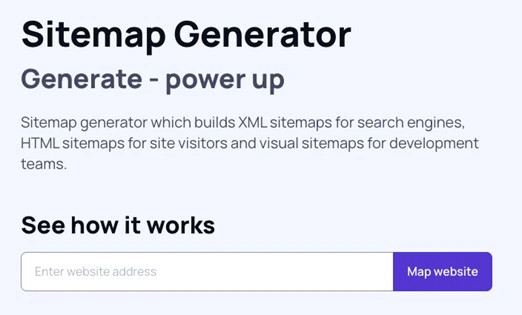
It's not a direct ranking factor, but it is a very useful tool for crawl efficiency and making sure new content gets discovered and indexed efficiently.
All you have to worry about is finding the URL of your sitemap and submitting this URL to Google Search Console (GSC) directly.
By just submitting your sitemap URL and then regularly monitoring your sitemap in GSC, you are keeping search engines up to date about all the changes, deletions, and additions you are making to the website, giving it far more relevancy.
10. Technical Control: Robots.txt & .htaccess Basics
These two powerful files are the unsung heroes of your WordPress site, directing the behaviour of your server and guiding search engine crawlers.
The robots.txt file tells crawlers where to avoid your site (admin pages), so they can put their time (crawl budget) towards the pages with the best content!
The .htaccess file governs essential regulations for the server, and perhaps most importantly, governs 301 redirects to transfer users and search authority from an old or broken URL to the suitable new page, and in the end, helps keep everything user-friendly, without errors.
11. Utilize HTTPS to Secure your site and Improve Security
Google declared HTTPS (Hypertext Transfer Protocol Secure) as a minor but strong ranking signal in 2014. In this competitive landscape, a site must be HTTPS-compliant.
HTTPS encrypts the connection from a user's browser to your website.
This serves 2 fundamental purposes: encryption of data between the user and website, and trust from site visitors.
If your site is still HTTP, you must install an SSL certificate (Many hosts have these for free and use Let's Encrypt) and force site-wide HTTPS redirects.
FAQs
1. What Is The Optimal Frequency To Measure The Speed Of My Site?
At the very least, you should be testing your site speed and your Core Web Vitals every month, anytime you add a new plugin, or do a major theme update. There are tools like Google PageSpeed Insights that will very easily allow you to find and fix any performance bottlenecks to offer your users a fast experience.
2. Do I Have To Pay For A Premium SEO Plugin?
Absolutely not. You can get your site set up with basic SEO using free plugins like Yoast or Rank Math. Premium plugins typically offer features such as local SEO tools, automated internal linking suggestions, and dedicated support.
3. How Quickly Can I Expect To See My Rankings Change?
Technical fixes will generally take weeks to show up, but content optimization will take 3 to 6 months to see any significant rankings improvement and consistent growth in traffic based on devoted, quality work.
The Wrap-Up: You Are Ready to Rank!
You've experienced from a basic WordPress installation to a highly optimised search engine machine!
Just remember to always focus on user experience, content and always follow solid technical best practices, to set your site up for long-term sustainable success.
5 Quick SEO Action Items
✔ Titles & Metas: Always write enticing titles and descriptions, with relevant keywords which will pertain to the click.
✔ Internal Linking: Build topical authority by connecting your most powerful pages to your new, relevant content.
✔ Content Depth: Be sure that you are providing the most comprehensive, valuable, and satisfying answer to the user's question.
✔ Speed & Mobile: Keep your site running fast as lightning, and looking perfect on any device.
✔ Technical Checkup: Make sure your robots.txt is checked on a regular basis, and that broken links are fixed.